Style Tracker: Your Free Fashion Diary, So You Never Repeat a Look
You find a great photo from last year's holiday party. Then you notice the dress. It's the one you were about to wear again this year, to the same party, with the same friends and the same cameras.
The Style Tracker is a free fashion diary in IAM Rate. It's a tab in the same app as the Daily Task Tracker, the Habit Tracker and the Plant Care Tracker. You write down what you wore and where, one row per outfit, from your earrings to your shoes. Before your next event, you look back at what you wore last time and pick something new. Be creative, and never wear boringly repetitive outfits.
Why keep a fashion diary
Photos last forever now. Every brunch, wedding and office party ends up on someone's phone. You may not remember what you wore to the last one, but the photos do, and so do the people who were there.
A fashion diary also helps you shop your own closet. When you see your outfits in one list, you notice the pieces you reach for every week and the ones you forgot you own. That silk blouse you love, the boots you haven't worn since spring. You get more looks out of the clothes you already have, and you know what's really missing before you buy something new.
It takes less than a minute a day. You don't need photos or a closet inventory. A few words for each piece is enough.
Log an outfit in a minute
Open the app and click the Style Tracker tab. The first time, you'll see a sample outfit called "Work (sample)", so the table isn't empty. Update it or delete it when you add your own.
- Click Add a style +.
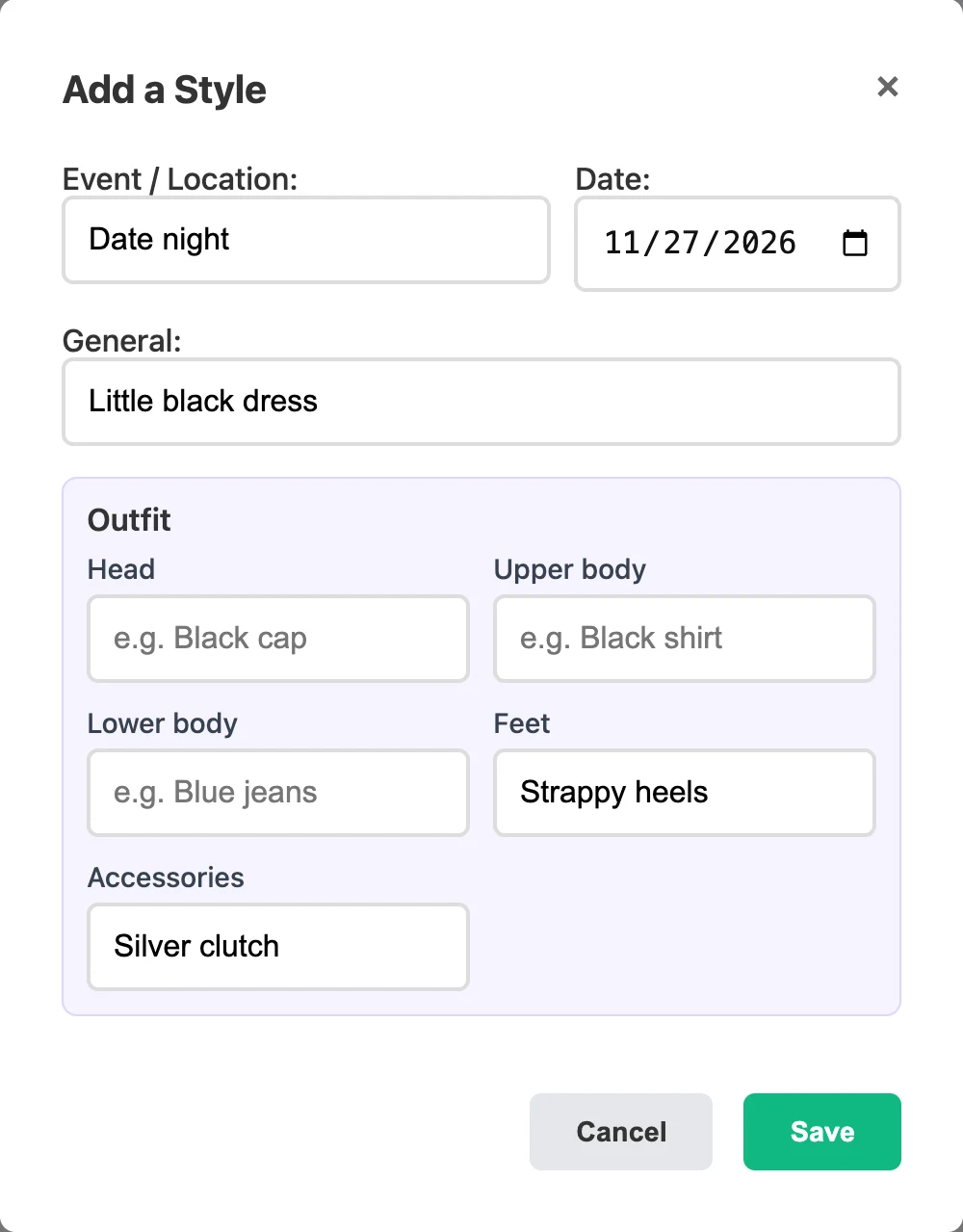
- Type the event or place, like "Work", "Date night" or "Sarah's wedding".
- Check the date. It's set to today, so change it if you're logging an earlier day.
- Fill in what you wore: head, upper body, lower body, feet and accessories. Wearing a dress? Put it under General.
- Click Save.
Tip: Be specific enough to tell pieces apart. "Emerald satin dress" helps more than "green dress" if you own more than one.
What goes in each column
| Column | What to write | Example |
|---|---|---|
| Event / Location | Where you went or what the day was | Work, Brunch with friends, Wedding |
| Date | The day you wore it | 11/26/2026 |
| General | A look in one piece | Emerald satin dress, Black jumpsuit, Witch costume |
| Head | Hats and hair accessories | Claw clip, Beret, Silk headband |
| Upper Body | Tops, sweaters, blazers and jackets | White silk blouse, Camel blazer |
| Lower Body | Skirts, pants and jeans | Floral midi skirt, Wide-leg pants |
| Feet | Heels, flats, boots and sneakers | Strappy heels, Ankle boots |
| Accessories | Jewelry, handbags, scarves and sunglasses | Gold hoops, Tote bag, Pearl necklace |
Dresses, jumpsuits and costumes
Some looks don't split into a top and a bottom. A dress, a jumpsuit or a Halloween costume is one piece. Write it under General and leave Upper Body and Lower Body empty. You can still add the shoes and jewelry you wore with it, like nude heels, a gold clutch and drop earrings with a satin dress.
Never repeat an outfit by accident
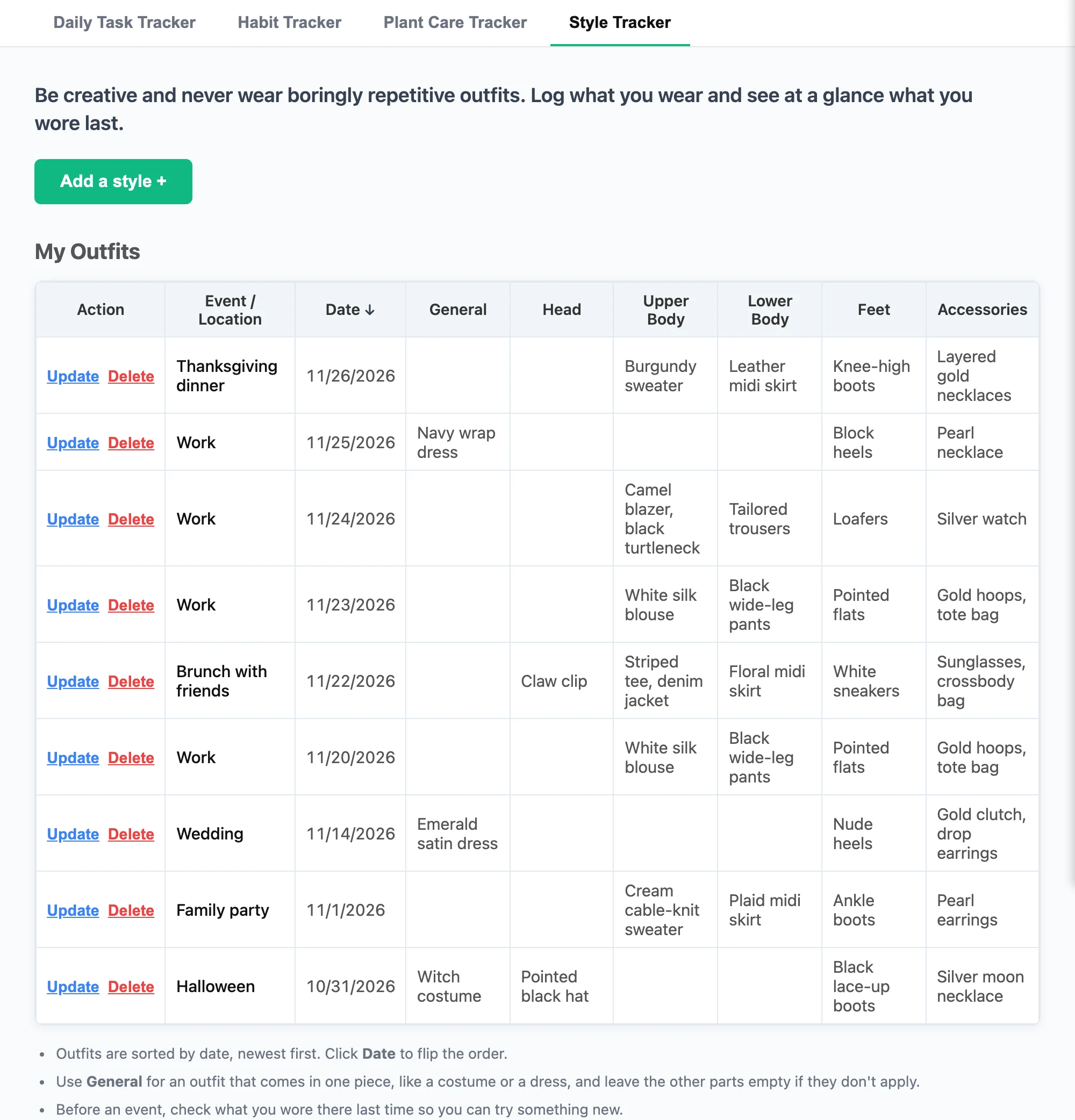
Outfits are sorted by date, with the newest at the top, so your latest looks are always the first thing you see. Click the Date heading to flip the order and start from the oldest.
Before an event, scan the rows for the same place. Look at the table near the top of this article. Work on 11/20 and Work on 11/23 are the exact same outfit: a white silk blouse, black wide-leg pants, pointed flats, gold hoops and a tote bag. With the diary in front of you, that's easy to spot, and easy to change next time.
One thing to know: the tracker doesn't warn you about repeats by itself. It keeps the record, and you take a quick look. For most people that's all it takes.
More looks from the clothes you have
Your diary is also a source of outfit ideas. A few easy ways to use it:
- Mix and match. Love that white silk blouse? Keep it and change the rest. Pair it with the plaid midi skirt and ankle boots instead of black pants and flats, and it's a new look.
- Let accessories do the work. The same navy wrap dress feels different with a pearl necklace and block heels than with gold hoops and sneakers.
- Build a capsule wardrobe. After a month, the pieces that show up most are your core. Those are worth spending on. The ones that never show up can go.
- Plan outfits ahead. Log a look for tomorrow's date the night before, then update it in the morning if you change your mind.
When a fashion diary helps most
| Occasion | How the diary helps |
|---|---|
| The work week | See if you've worn the same few pieces all week, and mix them up |
| Holiday parties and family photos | The same people see you every year, and the photos stick around |
| Weddings and showers | Remember which dress you wore as a guest last time |
| Date nights | Keep a few favorite looks and rotate them |
| Brunch and girls' night | Same friends, new outfit |
| Vacations | Pack from what you actually wore on your last trip, and leave the rest home |
| Interviews and big meetings | Wear something new to a second interview with the same people |
Use it on your phone
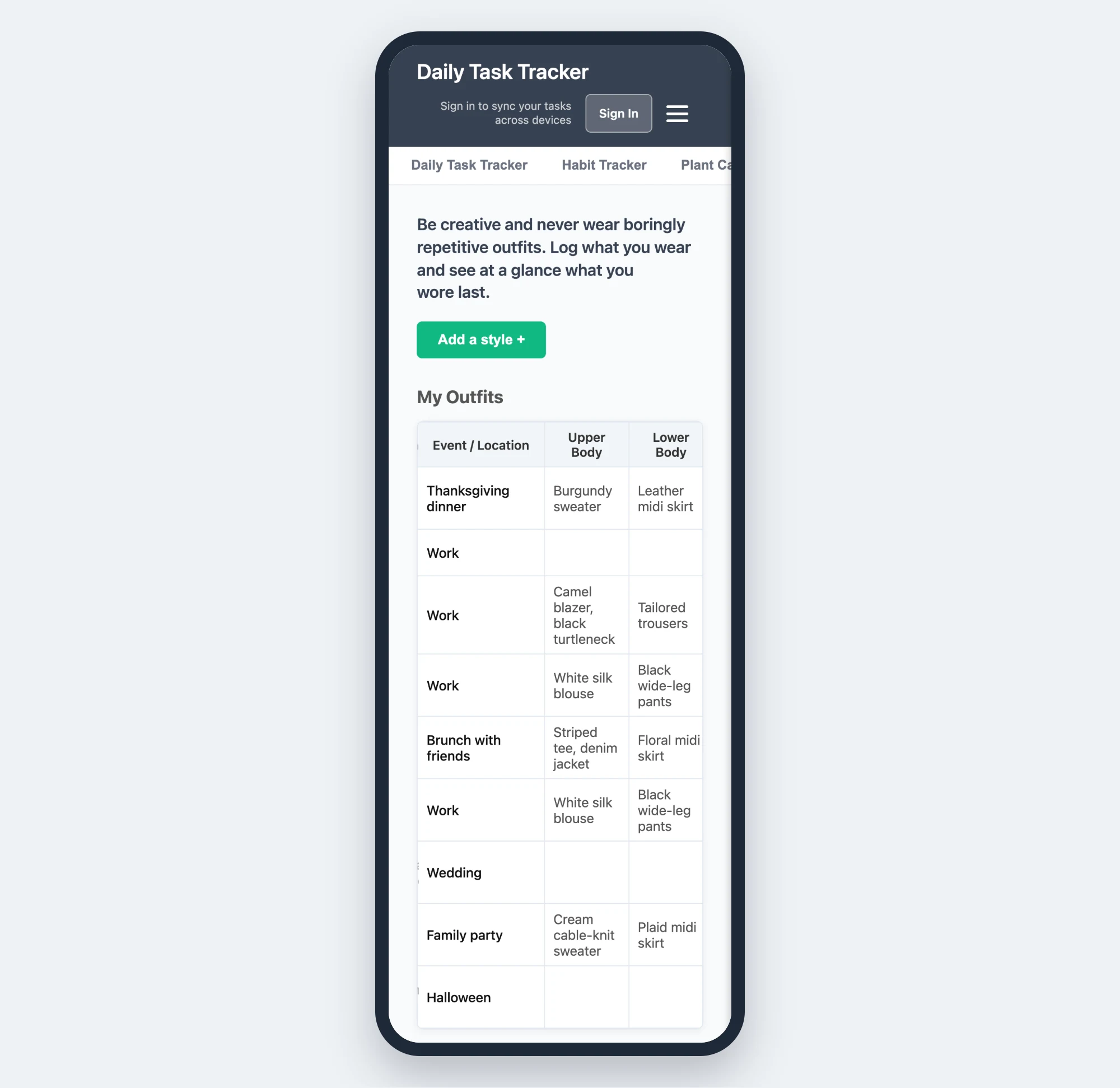
You get dressed far from your desk, so your phone is the handiest place to log your outfit of the day. On a small screen, the Event / Location column stays in place while you swipe sideways through the rest of the look.
You can also add IAM Rate to your home screen and open it like an app. The features article shows how.
Free, with no account
The Style Tracker is free in guest mode. There's no sign-up, and you can log as many outfits as you like. They are saved in your browser. If you clear your browser data, they're removed, so don't use a private window for it.
An account costs $18 a year, which is $1.50 a month. With an account, your outfits are saved online, and you see the same diary on your phone, laptop and tablet. Outfits you added as a guest move into your account when you sign in.
Your outfits, tasks, habits and plants in one place
The Style Tracker lives in the same app as your to-do list, your time log, the Habit Tracker and the Plant Care Tracker, so you don't need one more app for it.
Want to make laying out tomorrow's outfit a nightly routine? Add it to the Habit Tracker. For tips on planning the rest of your day, read how to build a daily to-do list. To see everything else the app does, read the full list of IAM Rate features.
Questions and answers
How do I track my time on daily tasks?
When you finish a task, type what you did, add the hours and minutes it took and pick a category. Daily Task Tracker adds it all up in charts for today, this week and this month, so you can see where your time goes.
What can I track in the app?
Four things, each in its own tab. The Daily Task Tracker logs your tasks and time. The Habit Tracker helps you build daily habits. The Plant Care Tracker keeps a watering schedule for your plants. The Style Tracker is a fashion diary for the outfits you wear. Everything is free in guest mode and works on your phone.
How do I make a weekly report for my manager?
Add a short note to your tasks as you go. At the end of the week, copy your plain text log or download the CSV and sort it by category. Your hours and notes are already in one place.
Is the app free?
Yes. Guest mode is free and has every feature in every tab, with your tasks, habits, plants and outfits saved in this browser. An account costs $18 a year, which is $1.50 a month, and keeps all of it on all your devices. You can cancel anytime.
Will I lose what I added as a guest if I sign up?
No. When you sign in, the tasks, habits, plants and outfits you added as a guest in that browser move into your account. Until then they are saved only in that browser, so download a CSV of your tasks now and then.
Can I use it on my phone?
Yes. It works in the browser on any phone, tablet or computer. You can also add it to your home screen and open it like an app.
Can I track my daily habits?
Yes. The Habit Tracker is a tab in the same app. Add a habit and choose how often: every day, every week, every month, every few days, weeks or months, on certain days of the week, or a number of times per week. Click Done today each time you do it. The app shows when each habit is due next, turns it red when it is late, and sums up how you are doing over the past week and month. A habit calendar shows every day you did it.
Can I keep a watering schedule for my plants?
Yes. The Plant Care Tracker is a tab in the same app. Add each plant with the last date and how often it needs watering, fertilizer, deep watering and repotting. The app shows the next date for each one. A date turns green on the day it is due and red when it is late.
Can I keep track of the outfits I wear?
Yes. The Style Tracker is a free fashion diary in the same app. Add each outfit with the event or place and the date, and what you wore, from tops, skirts and shoes to jewelry and handbags. Log a dress, jumpsuit or costume under General. The newest outfits are at the top, so you can check what you wore last time and try something new.
Is Daily Task Tracker good for people with ADHD?
Yes. It helps you work on one task at a time, keep a simple to-do list for the day and see your progress as you go. The daily goal cards make progress easy to see, so it is easier to stay focused and finish tasks.
How can I stop procrastinating and complete my tasks?
Add your tasks to a daily to-do list, pick the most important one and work on it until it is done. Logging the time you spend shows your progress, which helps you build momentum and avoid procrastination.
Start your fashion diary today
The Style Tracker is free. You don't need an account to start. Your outfits save right in your browser.
Go to App